ArgoCD
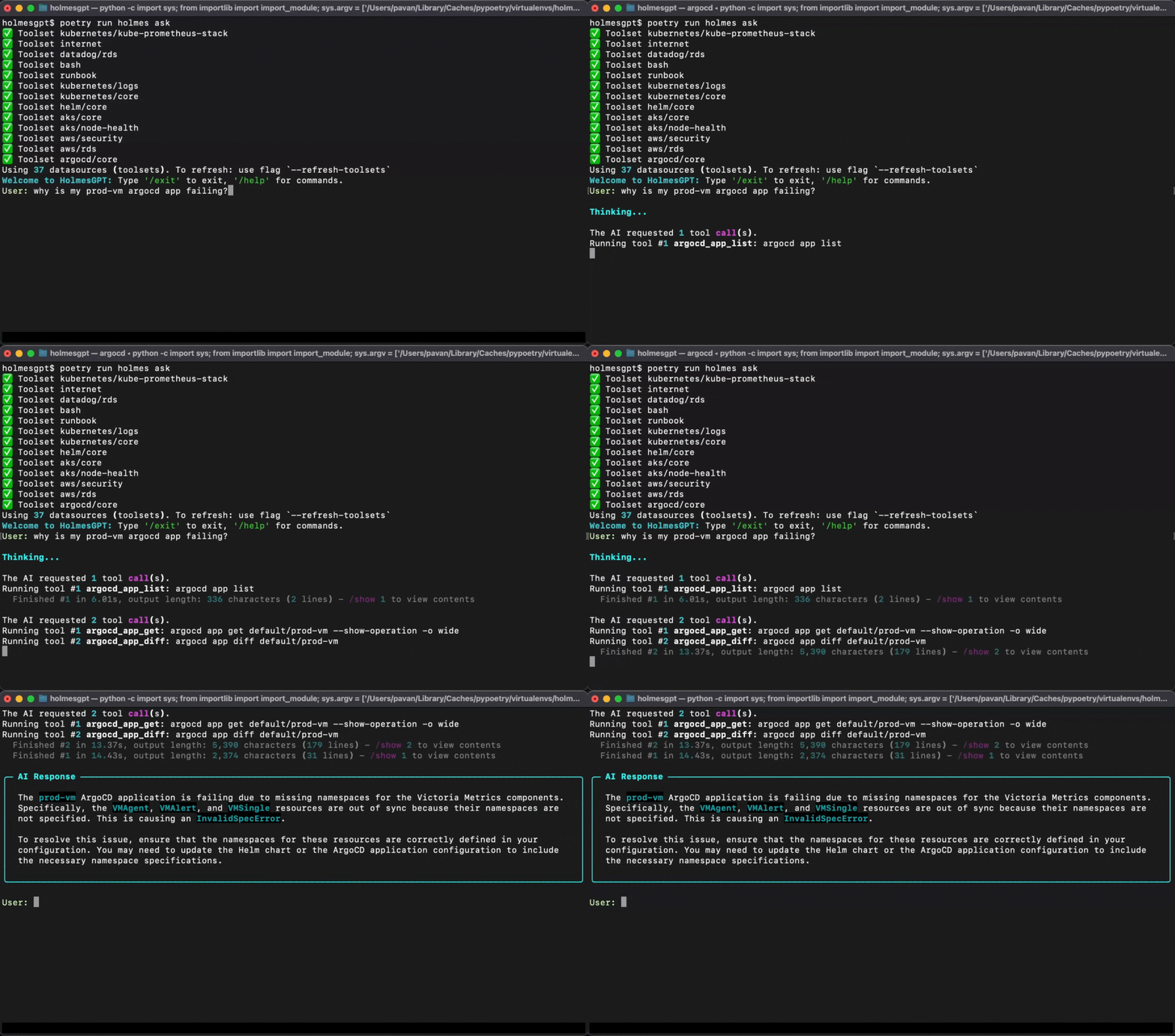
By enabling this toolset, HolmesGPT will be able to fetch the status, deployment history, and configuration of ArgoCD applications.
Prerequisites
Generating an ArgoCD token
This toolset requires an ARGOCD_AUTH_TOKEN environment variable. Generate an auth token by following these steps.
Adding a Read-only Policy to ArgoCD
HolmesGPT requires specific permissions to access ArgoCD data. Add the permissions below to your ArgoCD RBAC configuration.
Edit the RBAC ConfigMap: kubectl edit configmap argocd-rbac-cm -n argocd
# Add this to the data section of your argocd-rbac-cm configmap.
# Creates a 'holmesgpt' user with read-only permissions for troubleshooting.
data:
  policy.default: role:readonly
  policy.csv: |
    p, role:admin, *, *, *, allow
    p, role:admin, accounts, apiKey, *, allow
    p, holmesgpt, accounts, apiKey, holmesgpt, allow
    p, holmesgpt, projects, get, *, allow
    p, holmesgpt, applications, get, *, allow
    p, holmesgpt, repositories, get, *, allow
    p, holmesgpt, clusters, get, *, allow
    p, holmesgpt, applications, manifests, */*, allow
    p, holmesgpt, applications, resources, */*, allow
    g, admin, role:admin
Configuration
In addition to setting permissions and generating an auth token, you will need to tell HolmesGPT how to connect to the server. This can be done two ways:
- Using port forwarding. This is the recommended approach if your ArgoCD is inside your Kubernetes cluster.
- Setting the env var
ARGOCD_SERVER. This is the recommended approach if your ArgoCD is reachable through a public DNS.
1. Port Forwarding
This is the recommended approach if your ArgoCD is inside your Kubernetes cluster.
In Kubernetes, HolmesGPT needs permission to establish a port-forward to ArgoCD. The configuration below includes that authorization.
Set the environment variables:
export ARGOCD_AUTH_TOKEN="<your-argocd-token>"
export ARGOCD_OPTS="--port-forward --port-forward-namespace <your_argocd_namespace> --server <your_server_address> --grpc-web"
Add the following to ~/.holmes/config.yaml. Create the file if it doesn't exist:
After making changes to your configuration, run:
Create a Kubernetes secret in the namespace Holmes runs in:
kubectl create secret generic holmes-argocd \
--from-literal=ARGOCD_AUTH_TOKEN="<your-argocd-token>" \
--from-literal=ARGOCD_OPTS="--port-forward --port-forward-namespace <your_argocd_namespace> --server <your_server_address> --grpc-web" \
-n <namespace>
When using the standalone Holmes Helm Chart, update your values.yaml:
extraEnvVarsSecrets:
- holmes-argocd
customClusterRoleRules:
- apiGroups: [""]
resources: ["pods/portforward"]
verbs: ["create"]
toolsets:
    argocd/core:
        enabled: true
Apply the configuration:
Create a Kubernetes secret in the namespace Holmes runs in:
kubectl create secret generic holmes-argocd \
  --from-literal=ARGOCD_AUTH_TOKEN="<your-argocd-token>" \
  --from-literal=ARGOCD_OPTS="--port-forward --port-forward-namespace <your_argocd_namespace> --server <your_server_address> --grpc-web" \
  -n <namespace>
When using the Robusta Helm Chart (which includes HolmesGPT), update your generated_values.yaml:
holmes:
extraEnvVarsSecrets:
  - holmes-argocd

customClusterRoleRules:
    - apiGroups: [""]
      resources: ["pods/portforward"]
      verbs: ["create"]
toolsets:
    argocd/core:
        enabled: true
Apply the configuration:
Note
For in-cluster address, use the cluster DNS. For example: --port-forward --port-forward-namespace argocd --server argocd-server.argocd.svc.cluster.local --insecure --grpc-web
- Add
--insecureto work with self-signed certificates - Change the namespace
--port-forward-namespace <your_argocd_namespace>to the namespace in which your ArgoCD service is deployed - The option
--grpc-webinARGOCD_OPTSprevents some connection errors from leaking into the tool responses and provides a cleaner output for HolmesGPT
2. Server URL
This is the recommended approach if your ArgoCD is reachable through a public DNS.
Set the environment variables:
Add the following to ~/.holmes/config.yaml. Create the file if it doesn't exist:
After making changes to your configuration, run:
To test, run:
Create a Kubernetes secret in the namespace Holmes runs in:
kubectl create secret generic holmes-argocd-server-url \
  --from-literal=ARGOCD_AUTH_TOKEN="<your-argocd-token>" \
  --from-literal=ARGOCD_SERVER="argocd.example.com" \
  -n <namespace>
When using the standalone Holmes Helm Chart, update your values.yaml:
Apply the configuration:
Create a Kubernetes secret in the namespace Holmes runs in:
kubectl create secret generic holmes-argocd-server-url \
  --from-literal=ARGOCD_AUTH_TOKEN="<your-argocd-token>" \
  --from-literal=ARGOCD_SERVER="argocd.example.com" \
  -n <namespace>
When using the Robusta Helm Chart (which includes HolmesGPT), update your generated_values.yaml:
Apply the configuration:
Capabilities
The table below describes the specific capabilities provided by this toolset. HolmesGPT can decide to invoke any of these capabilities when answering questions or investigating issues.
| Tool Name | Description |
|---|---|
| argocd_app_list | List the applications in ArgoCD |
| argocd_app_get | Retrieve information about an existing application, such as its status and configuration |
| argocd_app_manifests | Retrieve manifests for an application |
| argocd_app_resources | List resources of an application |
| argocd_app_diff | Display the differences between the current state of an application and the desired state specified in its Git repository |
| argocd_app_history | List the deployment history of an application in ArgoCD |
| argocd_repo_list | List all the Git repositories that ArgoCD is currently managing |
| argocd_proj_list | List all available projects |
| argocd_proj_get | Retrieve information about an existing project, such as its applications and policies |
| argocd_cluster_list | List all known clusters |